Long range target monitoring and validation system
See every hole. Hear every shot called. Stay at your bench.
SpotterCam puts a camera right beside your target and the picture on a screen at your bench. Every new hole is marked and numbered as you shoot, and a voice calls each one: how far from center, what o’clock, and the clicks to dial. No squinting through a spotting scope, no walk downrange.
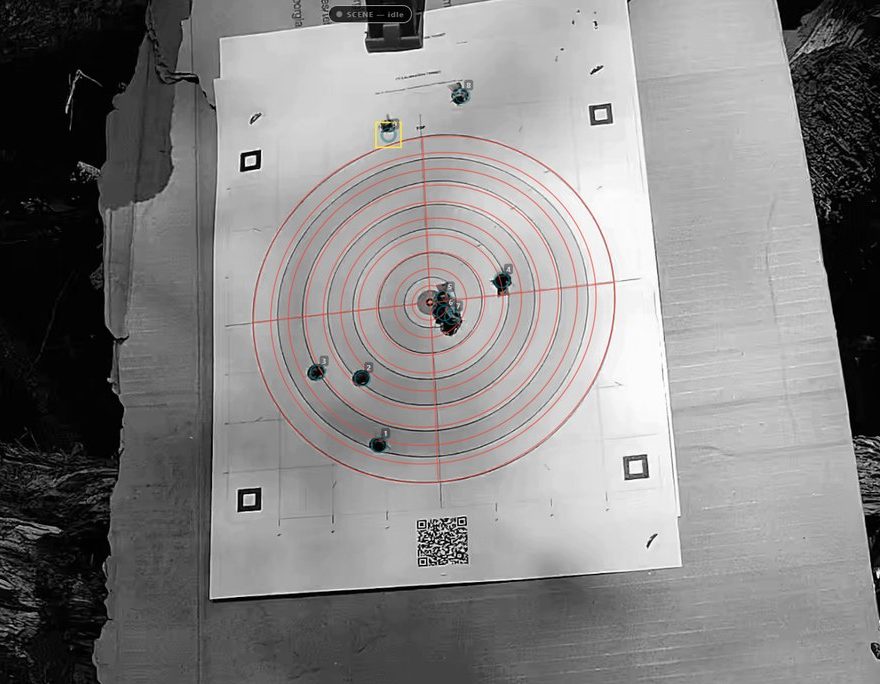
Shot 9, as the screen shows it3¾″ at 12 o’clock.
Complete kits from $3,990 CAD In beta
Every kit is built, licensed and tested before it ships. See the five kits
The camera goes downrange. You don’t.
Cameras ride battery-powered wireless stations right beside the far targets and send the picture back to your bench, so you see every hole up close at any distance and watch your group build shot by shot. The wireless link is rated up to 10 km line of sight, farther than the longest rifle shot ever reported. Every session is recorded, and you can stream it live to YouTube, Twitch or any compatible service while it records (going live needs internet).
Far targetsA zoom camera on a wireless station turns between several targets and keeps a score for each.
DownrangeA fixed camera on a wireless station watches one target. The station is a battery and a radio in a hard case; it sends the picture back to the bench.
Close inA fixed camera on a cable from the bench watches one target. Every camera stands in front of its target and off to one side.
Your benchThe unit and its screen sit in a hard case at your bench. See your cameras here and switch between them; scoring several cameras at once is an option.
Set up while the range is cold, then follow your shots from the bench. Wait for the range to go cold again before changing targets, adjusting equipment or packing up.
How it works
Three steps while the range is cold. After that, you stay at the bench.
Hang the target
Print a free SpotterCam target, or use one of ours, and pin it to your backer.
Place the camera
Set it beside the target, out of the line of fire, and point it at the target. Switch on the station, or run the cable.
Calibrate and shoot
Tap Calibrate, then Arm. From then on every hole is marked, numbered and called out as you shoot from the bench.
A real round at 200 yards
Nineteen shots of 30-30 on a 10 inch SpotterCam target, from a beta day. Press Shoot to fire the next one and see each hole marked and called the moment SpotterCam found it.
Real camera footage and SpotterCam’s real calls from that round, unedited. Bullet speeds were worked out afterward from the day’s recordings.
What it does at the range
Groups that build as you shoot
Each new hole is numbered on screen and the newest is ringed, so your group grows in front of you shot by shot. Start a new round on the same paper and the old holes are crossed out and left out of the count.
Every shot, called out loud
A voice calls each shot’s distance from center and clock position, then sums up your group after every string. Give it your scope’s click value and it tells you the clicks to dial.
Check any call yourself
Every call points at its ringed hole on screen. One tap confirms it or corrects it, and the round record keeps your word.
Shooters and scores, by name
Turn on multi-shooter mode and add everyone sharing the target. Each shot is filed under whoever fired it, the call says their name, and a live table shows shots, average, rank and who is up. Wrong name on a shot? Tap the purple button and move it.
The target in your hand
Open the unit’s page in your phone’s browser: no app to install, no internet needed, because the phone joins the unit’s own network. Watch the live target and the marked holes, confirm a shot, switch shooters and recalibrate from wherever you shoot.
Every session recorded, live if you like
Every session is recorded, so you can replay any shot and review the round later. Keep a card for each shot and a round report, or stream the session live while it records.
More at the bench
SpotterCam listens as well as watches. The camera sees every hole; the microphones check the detection. One at the bench hears every shot and the ones on the downrange stations hear the impact, so every marked hole is backed by the sound of its shot, and a shot heard with no new hole gets flagged. If detection ever misses one, tap Missed: every report helps make detection better. Fire before you tap Arm and it reminds you.
Turn and zoom a pan-tilt-zoom camera from the screen and jump back to any saved target view with a tap. Split screen puts your cameras side by side. Shoot on more than 30 target faces, including sheets with several targets. Need a hand? Report a problem right from the unit; remote help starts only when you tap Allow.
Coming: a station battery voltage reading, an Advanced power meter with battery level and power use, a downrange Wind meter, and a Weather station that adds temperature, humidity and pressure. See the station add-ons.
Shooting and recording need no internet, and your kit arrives activated. Live streaming needs a connection.
A day at the range with SpotterCam
Who does what, from the first string to packing up. No computer skills are needed.
Before the first string
Switch on the unit at the bench first. Then, while the range is cold, place the camera near the target and connect its cable or switch on its wireless station. A zoom camera can stay at the bench for close handgun targets. Back at the bench, tap Calibrate.
During the day
Shooters tap Arm, fire, and watch their holes appear. Change shooters with one tap; each shot is kept under the name of whoever fired it. If a camera gets bumped, the screen tells you.
When the target fills up
Either start a new round on the same paper, so the old holes get a red X and stop counting, or hang a fresh target and tap Calibrate again.
End of the day
Bring the camera in, close the cases and charge the batteries. Rounds stay on the unit for next time.
Kits, by how far you shoot
Pick by distance. Where a cable reaches the target, the camera is cabled to the bench. Past that, a wireless station sits beside the target on its own battery and sends the picture home, with no cable to run. A pan-tilt-zoom camera turns between targets, so one camera covers several.
- Unit
- The computer and screen at your bench, in a hard case.
- Camera
- Watches the target from nearby. A zoom camera can stay at the bench for close handgun targets.
- Wireless station
- A battery and a radio in a hard case beside a downrange camera, so no cable runs to the target.
- Pan-tilt-zoom camera
- A camera you turn and zoom from the bench, so one camera can cover several targets, one at a time.
Five complete kits. Each fixed camera watches its own target; a pan-tilt-zoom camera turns between several. Every kit includes the unit with the software installed and licensed, a portable display, the cameras with their stands, mounts and cables, a battery and charger, a quick-start card, and the first year of updates and support. The unit and every wireless station travel in a Nanuk hard case.
Handgun & Medium Range Kit
For bays and lanes where a cable reaches the target. One fixed camera on its stand, cabled to the bench, watching one target.
$3,990 CAD
Build from this kitLong Range Camera Kit
For rifle lanes too long to run a cable. One fixed camera on a battery-powered wireless station, watching one target.
$5,585 CAD
Build from this kitMedium Range PTZ Kit
The 25× zoom camera turns between saved targets. It can stay at the bench for close handgun targets, 10 to 20 yards. For farther targets, place it near the targets on a wireless station: add a station to this cabled kit, or choose the Long Range PTZ Kit.
$5,990 CAD
Build from this kitLong Range PTZ Kit
Several targets, far downrange. The 25× pan-tilt-zoom camera sits on a wireless station and turns between the targets you save.
$7,585 CAD
Build from this kitPremium All-In Kit
Three targets downrange, a camera for each. Three wireless stations: two fixed cameras with a target each, and a pan-tilt-zoom camera that turns between more. Switch between them from the bench.
$12,765 CAD
Build from this kit
Change a kit to fit your range
Start from any kit, then add stations and cameras, or a larger battery for a station. The price follows as you go.
Prices in Canadian dollars. Price rule, specifications and how ordering works
For ranges and clubs
A club system is the same equipment, sized to your line: one unit at the bench, a camera for each target you want scored at once, and a wireless station at each spot past cable reach. Members use it with their own names; the range officer controls when cameras go out.
Tell us the number of lanes, the distances, your busiest day and who will set it out, and we will build the quote with you. We put the contents and total in writing for your board before you commit.
Fewer cease-fires, nobody walking downrange to read paper, and every member’s rounds kept under their own name. That is the case for your board.
Questions
Something not covered? Ask us.
What is SpotterCam?
SpotterCam puts a camera aimed at your target and a screen at your bench, so you see and hear every shot without a spotting scope or a walk downrange. It marks and numbers every new hole as you shoot, calls out where it hit, and keeps a record of every round.
How far away can the target be?
SpotterCam is built for long range. The camera sits beside the target on a wireless station, so it sees every hole up close however far back your bench is. The wireless link is rated up to 10 km line of sight by the radio’s specification; it needs a clear line of sight between the radios and a clear view of the target. Tell us your distances and we match the kit to your range. For close handgun targets, 10 to 20 yards, a zoom camera can stay at the bench.
How accurate is it?
Each hole is marked where it sits on the paper after a one-tap calibration, and every call points at its ringed hole on screen, so you see for yourself. One tap confirms or corrects any shot.
Which kit do I need?
Where a cable reaches your target (handgun bays, shorter rifle lanes): the Handgun & Medium Range Kit. Past cable reach, one target: the Long Range Camera Kit. Several targets from one spot: a pan-tilt-zoom kit; the camera turns from target to target. Several lanes scored at the same time: a camera for each lane, set to be watched at the same time; build your kit, or start from the Premium All-In Kit. A club can also talk to us about the whole line.
Can several people shoot?
Yes, on the same target. Turn on multi-shooter mode, add names and take turns. Each shot is called with the shooter’s name and kept on their score.
Can one camera watch several targets?
A fixed camera watches one target. A pan-tilt-zoom camera turns between the targets you save, one at a time. For several targets watched at the same time, add a camera for each.
Who runs it at a club?
Whoever the range officer sends out to hang targets can set the camera too. After that, shooters only use Arm, Next shooter and New round. A phone can do the same from the bench.
How do members use it?
Turn on multi-shooter mode, enter the names and take turns on the target. Each member’s shots, groups and calls stay under their name, and any round can be saved as a round report to take home.
Do I need internet at the range?
No. Your kit arrives activated and works offline. A phone used as a second screen joins the unit’s own network. Updates, support requests and live streaming need a connection when you have one.
Can the camera get shot?
It sits low and off to the side, out of the line of fire, and only goes out once you know your shots land on the target. The camera placement guide shows where it goes. If a camera is ever hit, ask us about a replacement.
What does “in beta” mean?
The system works and kits ship. The first kits are with early customers, and prices are introductory while their feedback shapes the updates.
Can I buy one today?
Yes. Build your kit and send it; we reply with the exact contents, an invoice and a ship date, which depends on parts and bench time.
Where do my recordings go?
They stay on your unit. You decide when to export, stream or send something for support. Privacy details