Target sheets — print your own
You scanned the QR on a SpotterCam target. This is the page that code points at: the same sheet, free, print as many as you like.
Download
Target sheet v3 — PDF (US Letter)
Target sheet v3 — PNG (300 dpi)
The PDF is what you want for printing. The PNG is for screens, mock-ups and anyone assembling their own print run.
Print at 100% — this is the one rule
Everything the camera measures comes off the printed geometry, so the sheet has to come out of your printer at its true size.
- In the print dialog set Scale: 100% (or Actual size). Turn off "Fit to page", "Shrink oversized pages" and any borderless / poster mode.
- Use US Letter paper — 8.5 × 11 in.
- Plain white paper beats glossy. Glossy throws highlights that look like holes to any camera, yours included.
Check it with a ruler — two measurements, ten seconds
| Measure | Should be |
|---|---|
| Between the centres of two side-by-side corner squares | 7.15 in (181.6 mm) |
| Diagonally, centre to centre of opposite squares | 10.11 in (256.8 mm) |
| One black square, edge to edge | 0.45 in (11.4 mm) |
| Outer scoring ring, edge to edge across the bull | 7.0 in (177.8 mm) |
| The page itself | 8.5 × 11 in |
If the 7.15 in reads short, your printer scaled the page. Reprint at 100% rather than telling the app a different number — a scaled sheet quietly scales every group measurement with it.
What is actually on the sheet
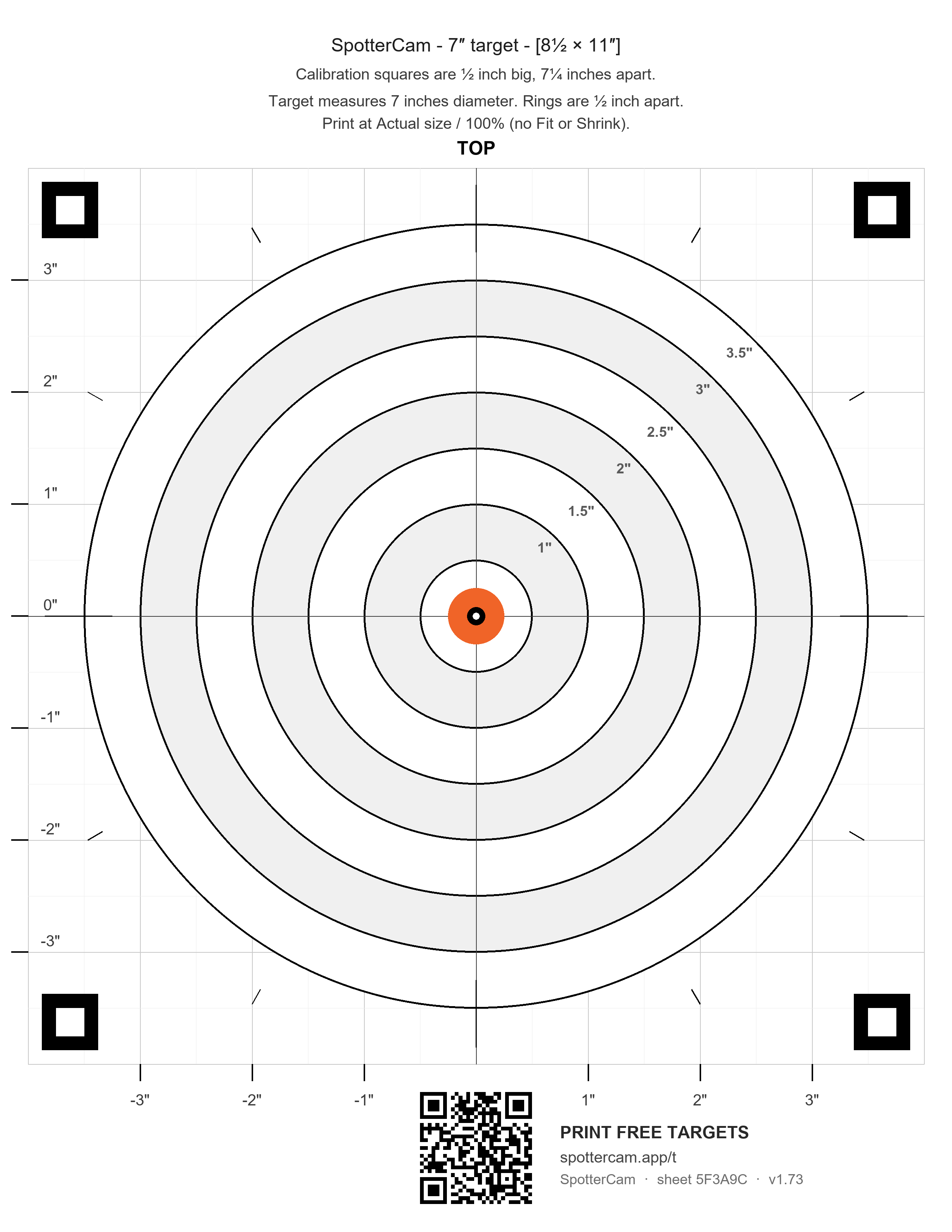
- Scoring rings and a crosshair about the bull, out to a 3.5 in radius, with tick marks at 4 in.
- Four fiducial squares — black squares with white centres, one near each page corner. Their centres sit on a 7.15 in square about the bull. This is how SpotterCam calibrates itself: it finds the four squares, works out where the camera is, and derives the bull, the scale and the perspective with no clicking.
- A QR code in the bottom margin. It is deliberately outside the rings, the ticks and the squares — nothing inside the target may look like a bullet hole. It carries the sheet's own geometry, so the app reads the paper size and ring size off the paper instead of assuming them, plus a link back to this page.
The sheet id
Each sheet carries an 8-character id in its QR (and as tiny text under the code). It is per generated sheet, not per shooter and not per print — every copy you run off one PDF shares that PDF's id. It exists so a saved round can say which sheet design it was shot on. It is not an account, it is not tracked, and nothing on this site logs it.
Other paper sizes
Don't have SpotterCam yet?
The sheet is just paper — anyone can shoot at it. SpotterCam is the camera system that watches it and calls every hit the moment it lands. spottercam.com